- marketing automation pricing
- automation costs
- SaaS pricing
- B2B budget
- marketing ROI
Marketing Automation Pricing: Models, Costs, Budgets
By Crescade · · 14 min read
Explore marketing automation pricing models and real costs to set a realistic budget. Compare options and find the best fit for your business.
Marketing automation pricing typically lands between$20 and $774 per month for software, with$3,000 to $100,000+ for implementation. In real year-one planning, total cost usually runs1.5x to 3x the advertised monthly fee once onboarding, integration, and admin time show up.
That's the budget trap most founders and marketing leaders hit. The quote looks manageable, the demo looks clean, then the first invoice lands with contact thresholds, setup fees, and integration work layered on top. A platform that seems cheap at launch can become a real operating expense as the database grows, especially for SaaS, B2B services, e-commerce, and property or investment platforms.
Table of Contents
- The Real Cost of Marketing Automation in 2026
- How the Main Pricing Models WorkPricing models compared
Typical Cost Ranges for SaaS and Managed Services
Hidden and Ongoing Costs Most Budgets Miss
Building the ROI and Budget Case
Example Budgets by Business Model
A Vendor Selection Checklist and What to Do Next
The Real Cost of Marketing Automation in 2026
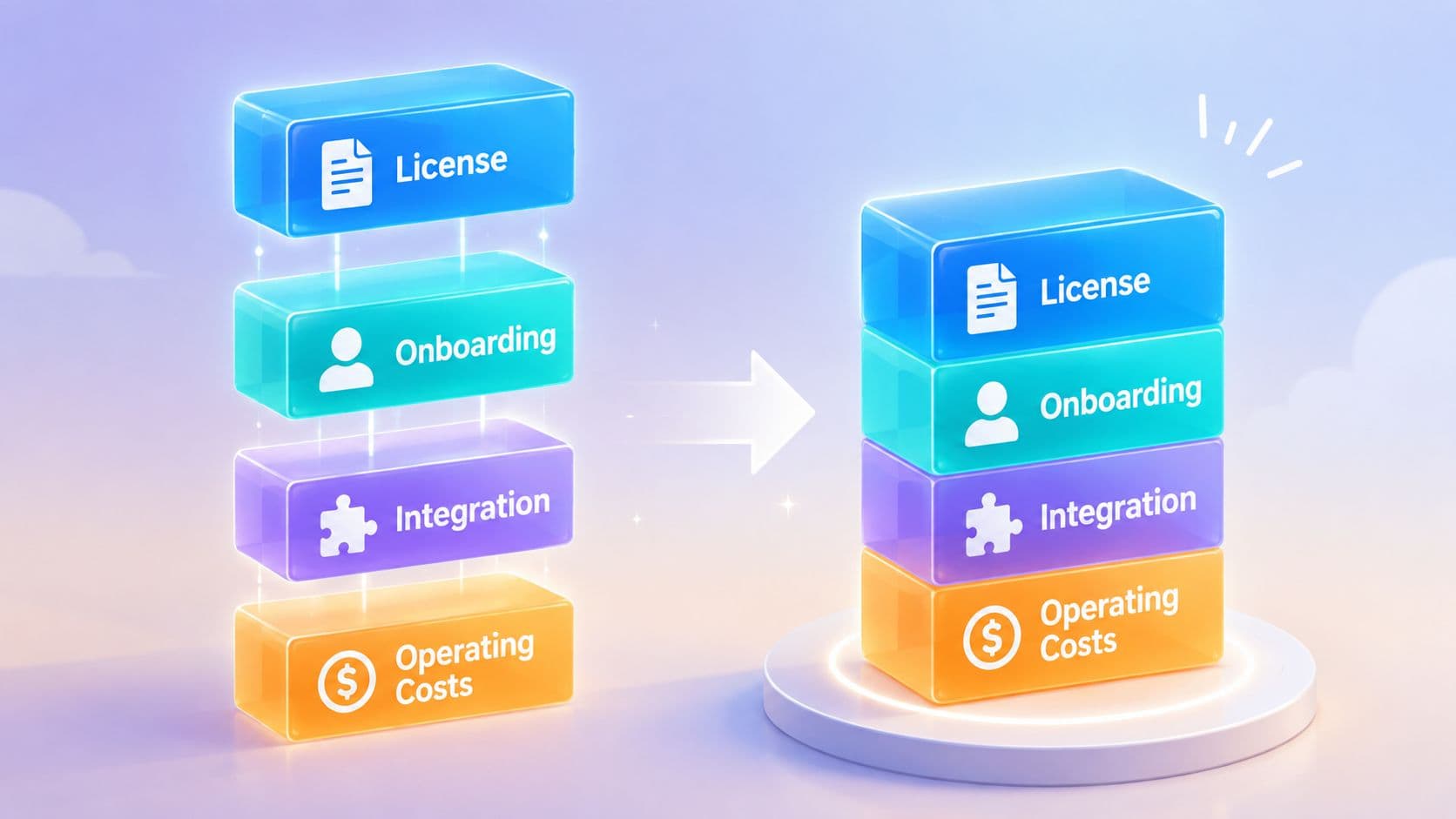
The first mistake buyers make is treatingmarketing automation pricing like a single line item. It isn't. The budget is a stack oflicense cost, onboarding, integration labor, add-ons, and operating time, and each layer gets heavier as the contact database grows.
Founders and growth leaders need to evaluate four pricing models with a clear eye:per contact,per active contact,per user, andfeature tiers with add-ons. The sticker price on a pricing page is only the starting point, because contact growth, send volume, and implementation work can change the economics fast. That matters whether the team is running lifecycle email for e-commerce, lead routing for B2B services, or complex investor journeys for property and investment platforms.
The practical question is not whether automation is worth it. The question is what the system costs once the CRM is connected, the scoring rules are live, and the reporting stack has been cleaned up. A tool that looks affordable at 1,000 contacts can turn into a larger fixed cost when the database expands and the billable definition changes.
Practical rule: budget the software as if the first quote is only the starting position, not the real number.
For teams that want the system run, not just licensed, the operating model matters just as much as the software itself. Crescade'smarketing automation thinking sits in that broader growth operations lane, where acquisition, conversion, lifecycle, and measurement are treated as one system instead of separate purchases.
How the Main Pricing Models Work
Pricing models compared
Each billing model rewards a different growth pattern and punishes a different kind of operational mess. Buyers who understand the billing logic usually make better decisions, because the cheapest-looking plan often becomes the most expensive once the database grows and the workflow gets dirty.
Per-contact pricing charges on the size of the database, often including records that never get opened again. That structure gets expensive in aging CRMs because unsubscribed, bounced, and dormant contacts can still count toward the billable total. It works best when list hygiene is strong and the team knows exactly which records count toward the bill.
Per-active-contact pricing narrows the charge to contacts engaged within a defined recent window. That can reduce cost for teams with large but stale databases, but it also forces tighter list hygiene and better segmentation discipline. If the CRM is messy, the savings disappear fast.
Per-user pricing attaches the cost to seats instead of contact volume. That fits collaboration-heavy B2B teams where sales, marketing, and RevOps all touch the same system. The catch is simple, more users mean more cost, so the platform gets expensive when too many people need access.
Feature-tier pricing with add-ons bundles capabilities into plan levels and charges extra for modules. This is common when advanced reporting, scoring, routing, or channel expansion sits behind higher tiers. It looks straightforward until the team needs one more capability and finds that the jump is much larger than the sticker price suggested.
| Model | Charges For | Best Fit | Watch Out For |
|---|---|---|---|
| Per-contact | Total records in the billable database | Teams with clean data and predictable list growth | Dormant contacts can still inflate cost |
| Per-active-contact | Recently engaged contacts | Teams with strong lifecycle hygiene | Savings depend on definition windows |
| Per-user | Seats or named users | Cross-functional B2B teams | Seat creep increases spend |
| Feature tiers with add-ons | Plan level plus modules | Teams that want packaged capability | Hidden jumps when features are added |
The useful way to think about this is direct.List growth changes software economics, and the billable definition matters more than raw CRM size. If the vendor charges on all records, the cost profile is very different from a system that charges only on active contacts.
The expense often hides in the billing rule, not in the headline subscription.
For growth teams that want the system run, not just licensed, the operating model matters as much as the software itself. Crescade'smarketing agency pricing models sit in that broader growth operations lane, where acquisition, conversion, lifecycle, and measurement are treated as one system instead of separate purchases.
Typical Cost Ranges for SaaS and Managed Services
The range is wide because pricing follows the database and the service layer, not just the feature list. For software alone, a basic starter plan can look cheap, but the first invoice rarely reflects the actual year-one spend once onboarding, integration work, and add-ons enter the picture. That matters because the same platform can look like a bargain in a small contact list and a serious line item once the business starts pushing volume.
Starter software often lands in a low monthly band for small databases, while mid-market plans move up fast as contacts, send volume, and modules stack together. A 2026 benchmark shows that entry pricing can sit very low while top-tier pricing jumps sharply, and another pricing comparison shows how one platform scales from a small contact base to a much larger one with a much larger monthly bill. Crescade's pricing analysis shows the same pattern clearly, the cost is the billing rule, the contact definition, and the extra modules tied to each tier.CostBench's 2026 pricing benchmark
What software usually costs
For smaller databases, basic email automation usually sits in a manageable monthly band, but that number only covers access. Once a team moves into larger contact counts, the software charge climbs quickly, and enterprise usage can reach a level where the annual license alone becomes a meaningful budget line. That is before the team pays for setup, data cleanup, and the integrations needed to make the platform useful.
For e-commerce teams, that means a low entry tier is fine only if the catalog, customer history, and event tracking stay simple. B2B services firms usually feel the jump later, then get hit by seat needs, workflow complexity, and reporting demands. Property and investment platforms should expect the software line to rise faster once they need multi-step journeys, lead routing, and account-level segmentation. Firework's marketing automation statistics roundup
What managed services usually cost
Managed automation is priced differently. The spend usually appears as a monthly retainer for strategy, build, campaign ops, reporting, and fixes rather than pure software access. That can look expensive if you only compare it to a license quote, but it can be the better financial choice when the alternative is hiring, training, and supervising an internal ops function that still needs senior oversight.
The break point is control versus labor. SaaS gives the team ownership of the system and keeps execution in-house. Managed services shift the operating burden off the internal team, which can be the better trade when speed, consistency, and campaign quality matter more than seat ownership. Compare the vendor quote to the labor cost of running the system, not just the subscription line.
Hidden and Ongoing Costs Most Budgets Miss
The first invoice is rarely the one that reflects true cost. Buyers approve the monthly license, then the budget gets hit by onboarding, integration labor, and the extra work needed to keep the system useful after launch.
The cost layers that change year one
Onboarding can be a real step up from the subscription line. Some setups start with a mandatory$3,000 onboarding fee, while enterprise-style implementations are often cited in the$5,000 to $100,000+ range depending on integration depth, custom objects, migration complexity, and multi-channel workflows. Crescade's own guidance onmarketing automation pricing treats that setup work as part of year-one cost, not a side note.
A separate pricing guide notes that setup and onboarding can add about$1,000 to $10,000 or more, with implementation and services running from roughly$2,000 to $10,000 upfront in many cases. For larger rollouts, the first-year bill rises fast because CRM integration, reporting cleanup, workflow design, and internal testing all sit outside the license.Anglara's cost guide puts that hidden work in plain view.
The budget checklist finance should insist on
- Billable contact definition: confirm whether the vendor charges on total records or only active contacts.
- Onboarding fee: ask for the implementation quote in writing, not just the monthly price.
- Integration work: budget for CRM sync, data mapping, and custom field cleanup.
- Add-ons and send caps: check whether reporting, scoring, or volume limits trigger extra charges.
- Seat expansion: verify what happens when sales, marketing, or RevOps needs more access.
- Admin time: reserve internal hours for scoring rules, routing, and reporting maintenance.
One trap matters more than buyers expect. If the contract charges on total CRM records rather than active contacts, the platform can cost more because the database is old, not because the team is sending more. That check belongs before signature, not after.
Enterprise buyers should also factor in one-time onboarding in the range of$3,000 to $7,000 on some tiers, plus implementation and ongoing operations.Everworker's 2026 breakdown reinforces the same point. The annual bill usually lands much higher than the monthly invoice suggests.
Building the ROI and Budget Case
A finance-friendly case starts with the full year-one cost, not the sticker price. License fees are only one line item. Onboarding, integration work, internal admin time, and paid add-ons change what the platform really costs after the first invoice.
The cleanest way to defend that spend is to tie it to pipeline, retention, and operating efficiency. CFOs do not need a feature tour. They need to see what changes because the system exists, what it costs to get there, and how fast the outlay comes back.
A simple payback frame
Start with current pipeline value. Then estimate the conservative lift from better lifecycle conversion, cleaner lead-to-opportunity routing, and stronger retention flows. Divide the year-one cost by the incremental value created, and the conversation shifts from software preference to budget discipline.
The business case is stronger when you show the math in plain terms. Use amarketing ROI framework that aligns spend with pipeline and retention outcomes. That gives finance a structure they can check instead of a vague promise that the platform will “help.”
A working example for a B2B SaaS team
Take a team that spends$1,800 per month on the platform and$15,000 on implementation. Year one is already$36,600 before internal admin time. If the team also pays for scoring, reporting, or extra workflow capacity, the bill rises again after the first invoice. If the system improves conversion and retention enough to create a modest amount of incremental pipeline, the cost is easy to justify. If it does not, the issue is not the subscription price. The issue is weak process design and poor ownership.
For a clean budgeting model, Crescade'smarketing ROI framework is the right companion. It forces the budget to line up with pipeline, retention, and the actual process change the team expects from automation.
Decision rule: if the team cannot name a measurable process change, the budget is probably buying software, not growth.
Example Budgets by Business Model
Different business models feel the pricing pain in different places. E-commerce usually absorbs more add-on complexity. B2B services usually care more about routing and qualification. Property and investment platforms tend to need the heaviest measurement and data structure.
E-commerce
A Shopify-scale brand on a mid-tier plan at25,000 contacts usually needs more than basic email. The budget should include the license, plus add-ons for SMS, reviews, and loyalty if those channels drive repeat purchase behavior. The license may look manageable, but the operating cost rises once the team wants post-purchase flows, segmentation, and channel coordination.
B2B services
A services firm on a per-active-contact plan at8,000 contacts usually spends more on integration and lead scoring than on the base subscription. The core value is not volume, it's speed and routing quality. If marketing can send the right lead to sales faster and with cleaner context, the system earns its place.
Property and investment platforms
A property or investment platform with50,000+ contacts needs custom objects, multi-touch attribution, and investor journey workflows. That setup usually pushes the budget into a more serious operating model because the system has to track behavior across multiple paths, not just send email campaigns. For larger databases, Forrester's benchmark is a useful sanity check, with monthly costs at100,000 contacts ranging from$1,750 to $4,500 and at250,000 contacts from$2,700 to $5,400, which works out to roughly$0.02 to $0.05 per contact at 100,000 and$0.01 to $0.02 per contact at 250,000. Forrester's benchmark shows how per-contact cost can fall as volume rises even while total spend stays high.
Crescade'sbudget allocation guidance fits well for teams deciding how much to reserve for platform, implementation, and ongoing operations. The point is simple, budget the system, not the subscription.
A Vendor Selection Checklist and What to Do Next
Good buyers don't ask, “What's the monthly fee?” first. They ask what the billable unit is, what the first 12 months really cost, and who will run the system after it goes live.
What to confirm in every demo
- Billable contact definition: total records or active contacts, and what happens when the list grows.
- Implementation quote in writing: separate the license from onboarding and services.
- Send caps and overages: understand where usage limits kick in.
- Year-one model: test the budget at1.5x and2x current list size.
- Reference customer fit: ask for a customer with similar size and channel mix.
The decision usually lands in one of three lanes. Buy the software and run it in-house. Buy the software and hire an agency to operate it. Or hire a managed growth operations partner that owns the system end to end. Crescade fits the last lane as an accountable, AI-assisted growth operations partner for teams that want acquisition, conversion, lifecycle, analytics, automation, and AI handled as one operating system.
If the team is still comparing quotes, the next move is simple. Gather the implementation scope, model the full first-year cost, and decide whether the internal team has the time and process maturity to run the platform well. If not, the cheaper license can become the most expensive option.
If the goal is to stop paying for disconnected tools and start running a tighter growth system, Crescade can help. VisitCrescade to see how an accountable, AI-assisted growth operations approach connects acquisition, conversion, lifecycle marketing, analytics, and automation into one managed system.